
SOC 2 TYPE 2 REPORT EXPLAINED: STRUCTURE, SECTIONS, AND HOW TO READ IT

Procurement teams regularly face a tricky situation when checking out potential vendors. They get handed thick security reports but struggle to figure out where they should even begin. In fact, the SOC 2 Type 2 report usually tops most vendor assessment checklists. Yet surprisingly, many professionals openly admit they have never actually read one from cover to cover. These reports definitely are not easy reads. But rather, they typically stretch between 60 and 100 pages, throw around technical terms, and follow a format that feels unfamiliar to most readers.
However, learning how to read a SOC 2 Type 2 report correctly makes a huge difference in vendor evaluations. Specifically, you will catch warning signs that others completely overlook. Additionally, you will ask sharper questions during due diligence meetings. Most importantly, you will base your decisions on real evidence instead of just surface impressions. Therefore, this guide zeroes in on the report itself. Consequently, you will discover its structure, understand what each section actually contains, and learn how to pull out the details that truly matter for your particular situation.
Tl; DR:
Concerns: Organizations struggle to interpret SOC 2 Type 2 reports during vendor assessments. Technical jargon, lengthy documents, and misunderstood sections lead to poor risk decisions and compliance gaps.
Overview: This guide breaks down SOC 2 Type 2 report structure into digestible sections. Readers learn what each component means, how to spot exceptions, and how to extract meaningful security insights.
Solution: Follow a systematic review process focusing on scope, criteria alignment, and control testing results. Understand exceptions in context, verify examination periods, and integrate findings into broader vendor risk assessments.
SOC 2 TYPE 2 REPORT
First of all, a SOC 2 Type 2 report documents an independent examination that’s conducted by a licensed CPA firm. Essentially, the firm checks whether security controls actually worked as promised over a specific timeframe. Typically, this period runs between six and twelve months. Furthermore, the examination follows standards that the American Institute of Certified Public Accountants (AICPA) has established.
Now, the “Type 2” designation matters quite a bit here. Type 1 reports simply verify whether controls were designed properly on one specific date. In contrast, Type 2 reports actually test whether those same controls functioned correctly throughout an entire examination period. Therefore, when you’re assessing vendors, Type 2 delivers considerably stronger assurance.
Meanwhile, SaaS companies, cloud providers, and various technology firms regularly pursue these reports. After all, their customers want solid proof that security controls work reliably over time, not just confirmation that they exist in some policy document.
SOC 2 TYPE 2 REPORT STRUCTURE: THE FIVE MAIN SECTIONS
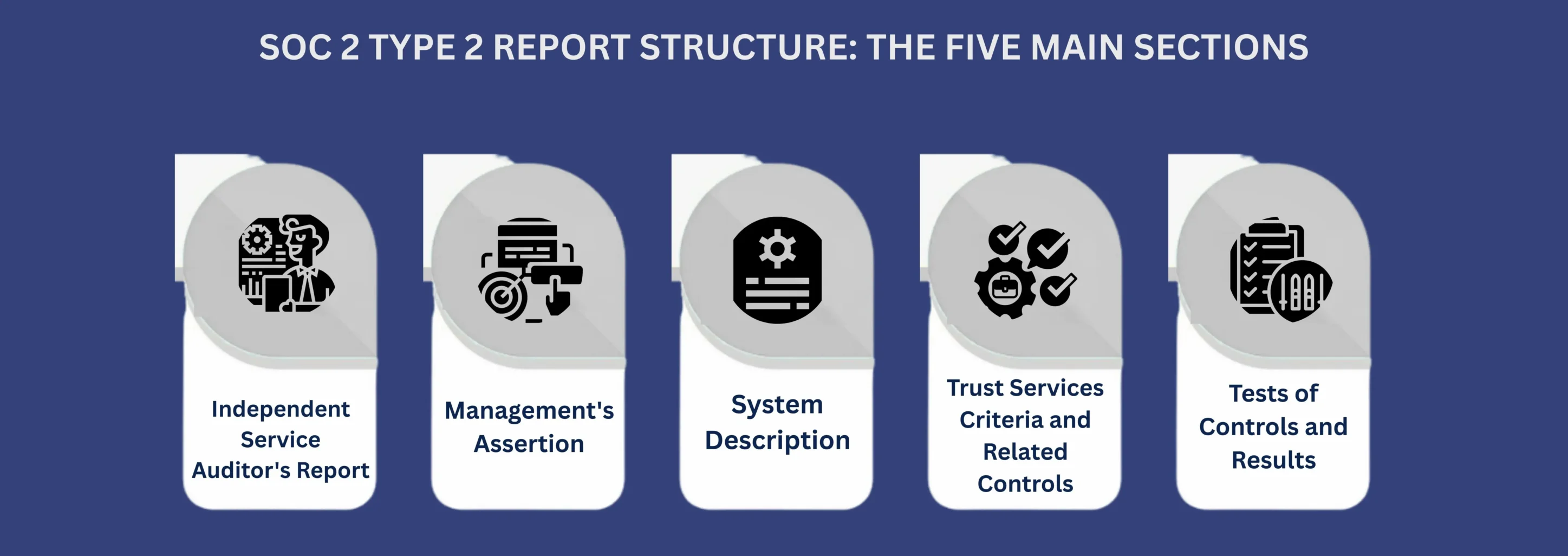
Notably, every SOC 2 Type 2 report follows a predictable layout. As a result, understanding this structure helps you move through the document efficiently and locate important information much faster.
Section 1: Independent Service Auditor’s Report
To begin with,in a SOC 2 Type 2 report this section shows up first and includes the CPA firm’s formal opinion. Essentially, the opinion summarizes whether controls satisfied the Trust Services Criteria during the examination period. However, it’s definitely not a promise that zero security problems will happen. Instead, the auditor simply shares their professional judgment that controls worked effectively based on the testing they performed.
When reviewing a SOC 2 Type 2 report, here’s what to look for:
First, the examination period dates show you exactly when controls were tested. Next, the opinion paragraph tells you whether controls were “suitably designed” and “operated effectively.” Both of these points really matter in a SOC 2 Type 2 report. Additionally, the inherent limitations paragraph spells out what the report can’t guarantee. Essentially, controls lower risk but can’t stop every single security incident.
Moreover, the responsibilities section makes it clear who handles what. Management designs, sets up, and runs the controls. Meanwhile, the auditor independently checks whether those controls actually work.
Section 2: Management’s Assertion
Before auditors release their opinion, management formally states three key things. First, they confirm that the system description accurately shows their real system. Second, they claim controls were designed correctly to satisfy applicable Trust Services Criteria. Third, they declare that those controls operated effectively throughout the entire SOC reporting period, which aligns with the defined SOC 2 examination period.
Importantly, these aren’t just casual comments. Management officially goes on record. Then, the auditor tests whether these claims actually stand up when examined closely. Basically, you’re seeing what management claims first, then what the auditor actually verified.
Section 3: System Description
Crucially, in a SOC 2 Type 2 report, this section deserves your most careful attention. It spells out exactly what got examined. Anything not mentioned here falls completely outside the report’s coverage.
Specifically, the description covers which services were included in the examination. It also outlines infrastructure pieces like servers and networks and software systems that were in scope, plus how data moves through these systems. On top of that, it covers the control environment, including how the organization is structured, along with its policies and procedures.
Here’s the critical point many readers miss:
A vendor might run ten different products. However, a SOC 2 Type 2 report might only cover one of them. Therefore, if you’re buying a different product or sharing data with a different system, you have to check the report accordingly.
So, always compare the system description directly against your specific use case. Ask yourself these questions: Does the described system match what I’m actually purchasing? Will my data flow through these particular systems? Are there other systems involved in my vendor relationship that aren’t even mentioned here?
If your answers show gaps, then the report probably won’t give you the assurance you need.
Section 4: Trust Services Criteria and Related Controls
Moving forward, this section connects the vendor’s controls to the Trust Services Criteria. Understanding these connections helps you figure out whether controls tackle the right objectives.
The five Trust Services Criteria:
| Criterion | Focus Area | Mandatory/Optional |
|---|---|---|
| Security | Unauthorized access prevention | Mandatory for all reports |
| Availability | System uptime and accessibility | Optional |
| Processing Integrity | Accurate, complete processing | Optional |
| Confidentiality | Protection of designated information | Optional |
| Privacy | Personal information handling | Optional |
Notably, security shows up in every SOC 2 Type 2 report because it’s required. Meanwhile, the other four get selected based on your organization’s service commitments and contractual requirements.
For each included criterion, you’ll see specific control activities listed. Therefore, pay close attention to how controls link to criteria. A well-built report clearly shows connections between what each control does and which criterion it’s supposed to satisfy.
Section 5: Tests of Controls and Results
Importantly, this section holds the most detailed information and usually runs the longest. It reveals what actually happened during testing.
Now, auditors don’t test a single instance of every control. Instead, they pick samples that give reasonable assurance. Common testing methods include reviewing documentation, checking evidence like logs and tickets, watching processes happen in real time, and examining system configurations.
For each tested control in the SOC 2 Type 2 report, results indicate whether it worked as designed. Usually, results follow a standard pattern: the control objective gets stated, the control activity gets described, the testing procedure gets explained, the test results get documented, and exceptions get noted if there are any.
What exceptions actually mean:
Essentially, exceptions show that a control didn’t work as intended during at least one test. However, exceptions don’t automatically rule out a vendor. Instead, evaluate exceptions using these three factors:
Nature: What actually went wrong? Was the control completely missing, or did it just work with small deviations? Understanding the root cause really helps assess how serious it is.
Frequency: How often did this exception happen? One isolated incident during a twelve-month stretch is vastly different from problems that keep happening.
Management Response: What did the organization actually do about it? Strong responses within a SOC 2 Type 2 report usually include figuring out the root cause, putting corrective actions in place, and adding preventive steps to stop it from happening again.
Notably, CertPro, a licensed CPA firm registered with the AICPA, carefully documents these details. As a result, readers can understand actual risk instead of just counting up how many deviations occurred.
HOW TO READ A SOC 2 TYPE 2 REPORT: THE STEP-BY-STEP PROCESS
The next section will dive into how to tackle reading an actual report efficiently in around 90 to 120 minutes, approximately-
Step 1: Start with the basics
The first step typically takes about 10 to12 minutes to complete. For that, you have to open the Independent Service Auditor’s Report. Then, note the examination period dates. Next, check the opinion paragraph for any qualified opinions or disclaimers. Ultimately, this quick review shows you whether the report is recent enough and whether it contains any immediate red flags.
Step 2: Review the System Description carefully
After that, read this section SOc 2 Type 2 report thoroughly. Specifically, compare every element to your particular use case. Ask yourself: Is this the system I’ll actually use? Does this match what the sales team told me? Importantly, if you find major misalignment here, then the rest of the report won’t give you relevant assurance. Plan to spend about 20 to 30 minutes on it.
Step 3: Verify Trust Services Criteria alignment
Next, you can expect the third step to take approximately 5 to 10 minutes. Check which criteria were included in the examination. For instance, if you need assurance about uptime but Availability isn’t included, then the report has a gap.
Step 4: Focus on relevant controls
Furthermore, you don’t need to read every single control description. It usually takes around 30 to 45 minutes. Instead, identify your highest risk areas and focus there. For each relevant control, read the description, review the testing procedure, check the results, and note any exceptions.
Step 5: Evaluate exceptions thoroughly
Meanwhile, if exceptions exist, evaluate SOC 2 Type 2 report using nature, frequency, and management response. Additionally, consider asking the vendor for more information about those exceptions. Completing the step might take roughly 15 to 30 minutes.
Step 6: Check the dates one more time
Finally, allow 5 minutes to complete the first step and verify the examination period again. How current is this report? If it ended more than six months ago, then consider requesting a bridge letter or updated report.
COMMON MISTAKES TO AVOID
Even experienced professionals make these errors when reviewing SOC 2 Type 2 reports:
- Only reading the opinion page without understanding the full context and all the supporting details.
- Ignoring the System Description, which actually defines what’s covered in the report.
- Treating all exceptions equally instead of carefully evaluating each one individually based on its specific circumstances.
- Assuming clean reports mean perfect security when controls can only reduce risk, not eliminate it.
- Skipping the examination period dates and not checking how recent the testing actually was.
- Reading reports in isolation instead of combining them with other due diligence activities like questionnaires and reference checks.
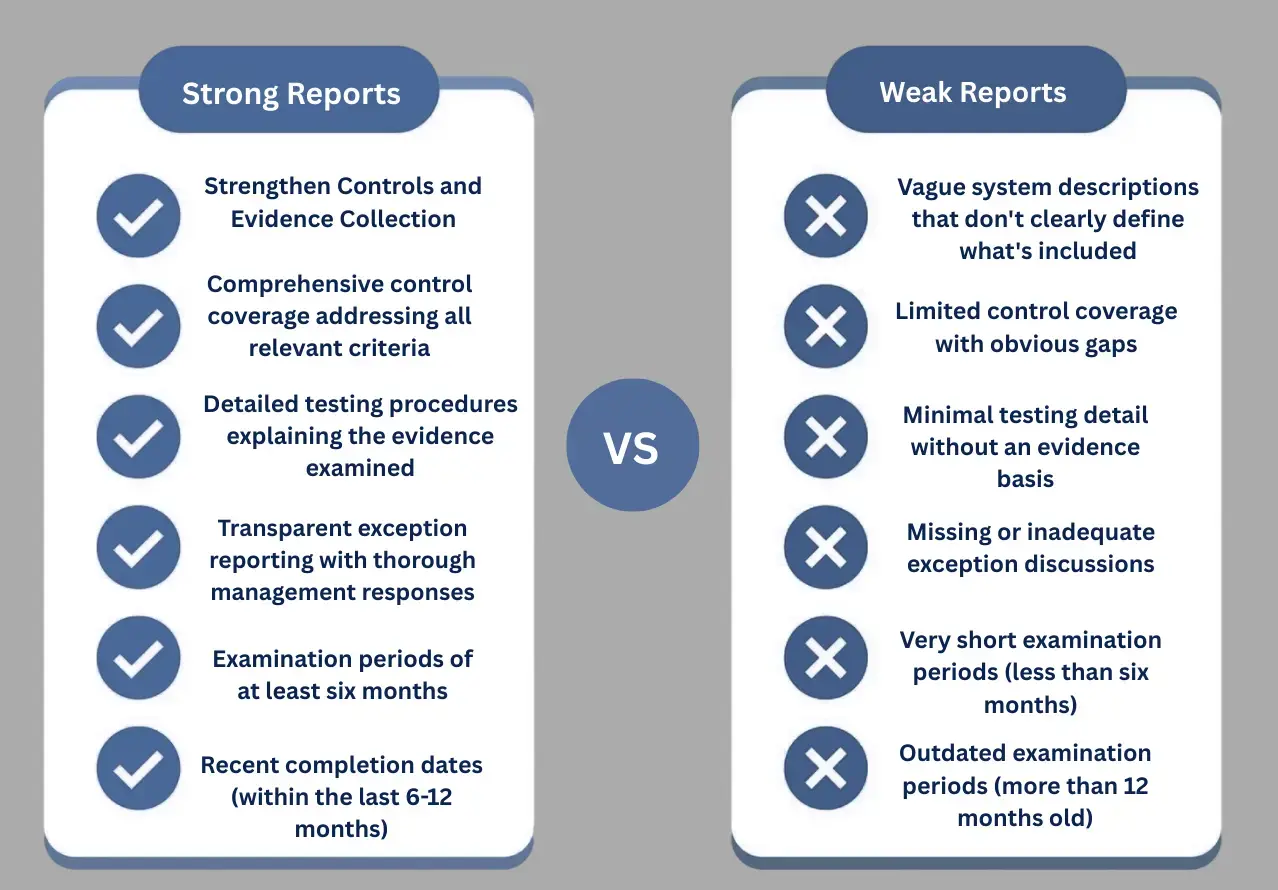
WHAT MAKES A STRONG VS WEAK REPORT
A strong SOC report provides clear, well-tested evidence of control effectiveness, while a weak one leaves gaps that raise more questions than answers. The differences are listed below:
USING REPORTS EFFECTIVELY IN VENDOR ASSESSMENTS
Certainly, reading the report is just the first step. Here’s how to actually use it during vendor evaluations.
First, compare the SOC 2 Type 2 report against your specific requirements. Specifically, list your security requirements first, then map them to controls shown in the report. As a result, identify gaps where your requirements go beyond what’s documented.
Next, use the report to develop targeted questions for vendor discussions. For example, instead of asking “How do you handle security?”, try asking “I noticed an exception in your access review control. Can you walk me through what happened and how you’ve addressed it?”
Furthermore, coordinate with other assessments. If you’re running security questionnaires or penetration testing, then use the SOC 2 Type 2 report to guide those activities. Consequently, focus additional testing on areas with exceptions or gaps.
Also, request supplemental information if the SOC 2 Type 2 report doesn’t cover systems or criteria that matter for your needs. Finally, document your review by creating a summary of findings, concerns from exceptions, gaps needing additional assurance, and follow-up questions.
HOW REPORTS RELATE TO OTHER COMPLIANCE FRAMEWORKS
ISO 27001: Provides a prescriptive information security management framework. Notably, many controls overlap with SOC 2, which makes examinations smoother for certified organizations.
GDPR: The Privacy criterion in SOC 2 Type 2 reports often supports GDPR requirements around data handling and security. However, SOC 2 doesn’t guarantee GDPR compliance.
HIPAA: Similarly, SOC 2 reports covering Security and Confidentiality demonstrate controls relevant to HIPAA requirements. Nevertheless, they don’t replace HIPAA-specific assessments.
Overall, most compliance frameworks share common ground around access controls, encryption, monitoring, and incident response.
REPORT VALIDITY AND UPDATE TIMING
Generally, organizations complete SOC 2 Type 2 examinations annually. Each report covers six to twelve months of testing. Meanwhile, customers typically rely on reports for about one year before requesting updates.
Therefore, check when the examination period ended, not when the report was issued. For instance, a report issued in March covering July through December only covers December.
Once organizations receive their SOC 2 Type 2 report, they should distribute it selectively. After all, these documents contain sensitive security details. Consequently, most organizations require non-disclosure agreements before providing copies and establish clear procedures for report requests.
Additionally, smart organizations use report findings to drive improvement. Indeed, even clean reports often reveal opportunities to strengthen controls.
WHO CAN ISSUE THESE REPORTS
Importantly, only licensed CPA firms can issue SOC 2 Type 2 reports. Furthermore, those firms must follow AICPA attestation standards and maintain complete independence from the organization being examined.
Clearly, independence is absolutely crucial. Specifically, if the CPA firm provides consulting services or has financial relationships with the organization, it cannot also serve as the independent auditor.
Notably, CertPro operates as an independent licensed CPA firm registered with the AICPA. Therefore, we maintain the strict audit standards required for SOC 2 Type 2 examinations.
CONCLUSION
Ultimately, learning to read SOC 2 Type 2 reports properly transforms vendor assessments. Instead of relying on surface impressions, you’re actually evaluating real evidence about how controls operated over time.
Specifically, the five main sections each serve distinct purposes. The Independent Service Auditor’s Report provides the formal opinion. Meanwhile, Management’s Assertion establishes accountability. Additionally, the System Description defines the scope. Furthermore, the Trust Services Criteria map controls the objectives. Finally, Tests of Controls show what actually happened during the examination.
Overall, reading these sections systematically takes about two hours. However, it provides far better insight than just skimming the opinion page. As a result, you’ll spot exceptions that truly matter, identify scope gaps, and ask better questions during vendor discussions.
Remember that these reports document historical performance. Therefore, they provide evidence of security commitment and control maturity. Nevertheless, they don’t guarantee future results or eliminate all risk. Consequently, use them as one component of comprehensive vendor risk management alongside questionnaires, reference checks, and contract reviews.
FAQ
What is a SOC 2 Type 2 report?
It’s an independent examination by a licensed CPA firm. The report evaluates whether security controls operated effectively over a specific period, typically six to twelve months, following AICPA standards.
How long does a SOC 2 Type 2 examination take?
The testing period runs six to twelve months. Beyond that, the actual audit process, including preparation, fieldwork, and report issuance, usually takes three to six additional months.
What are the Trust Services Criteria in a SOC 2 Type 2 report?
They’re standardized evaluation benchmarks covering Security, Availability, Processing Integrity, Confidentiality, and Privacy. Security is mandatory; organizations select other criteria based on services and customer commitments.
Can a SOC 2 Type 2 report have exceptions?
Yes. Exceptions indicate controls that didn’t operate as intended during testing. They don’t automatically invalidate the report. Evaluate each exception’s nature, frequency, and management response to assess actual risk.
How often should organizations update their SOC 2 Type 2 report?
Most organizations complete examinations annually. Customers typically rely on reports for about one year before requesting updates. Plan examination cycles to avoid coverage gaps during critical sales or renewal periods.
Who can issue a SOC 2 Type 2 report?
Only licensed CPA firms registered with AICPA can issue these reports. The firm must maintain complete independence from the organization being examined to ensure objective, credible assurance without conflicts of interest.
Does a SOC 2 Type 2 report cover an entire organization?
No. It only covers systems and services defined in the System Description section. Other products, services, or departments might exist but weren’t evaluated if not explicitly included in the examination scope.
HOW SOC 2 COMPLIANCE SOFTWARE CHANGES AUDIT READINESS
There's a version of SOC 2 preparation that most security teams know too well. The audit date is approaching. Someone sends a spreadsheet asking for access logs, vendor assessments, and approval records. People scramble. Documentation gaps appear. What should take...
HOW SOC 2 TYPE II CERTIFICATION IMPACTS CUSTOMER CONFIDENCE AND DATA SECURITY
Enterprise buyers changed how they evaluate vendors. They no longer trust self-reported security claims. Instead, vendor risk management became a top priority. Consequently, procurement teams demand independent proof. They need verification that vendors protect their...
SOC 1 VS SOC 2: WHICH REPORT YOUR CUSTOMERS ACTUALLY ASK FOR
If you sell SaaS or provide outsourced services, you have likely been asked for a SOC report. However, the follow-up question is rarely easy to answer: do they mean SOC 1 or SOC 2? Both reports fall under the AICPA’s System and Organization Controls (SOC) reporting...